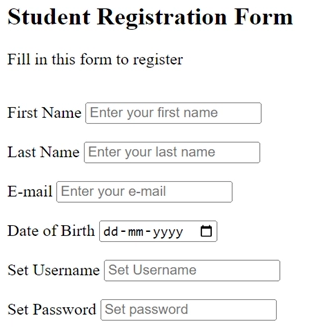
The <form> tag is a container for various input elements that allow users to enter and submit data to a server. It's one of the most important elements in HTML for creating interactive web pages.
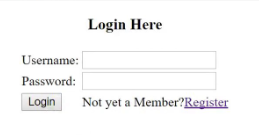
The<input> element in HTML is used to create interactive controls in web forms to accept data from the user.
Input has a several attributes :
| type = "text" | |
| type = "password" | |
| type = "email" | |
| type = "number" | |
| type = "checkbox" | |
| type = "radio" | |
| type = "button" | |
In HTML, the <label> element is used to define a label for an input element, helping users understand what the input is for. It also improves accessibility and usability, especially for screen readers.
<label for="user-name"> User Name:
<input type="text" name="name" id="user-name" />
</label>
<label for="pass-w"> password :
<input type="password" name="password" id="pass-w" />
</label>
Placeholder : to display a short hint or example text inside the field.
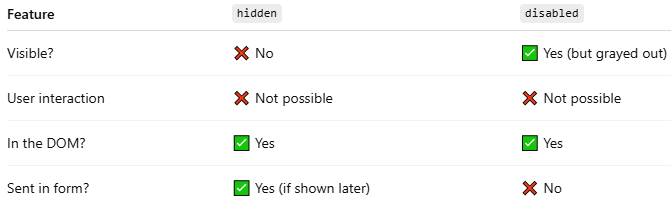
Hidden : used to hide an element from the page.
Disabled : used to make form elements uneditable and unclickable.
Value : used to specify the initial value of a form element like <input>, <button>.
Required : used to make form fields mandatory.
Autofocus : used to automatically place the cursor inside a specific form field as soon as the page loads.
Maxlength : used to set the maximum number of characters a user can enter in an <input> or <textarea> field.
Minlength : used to set the minimum number of characters that the user must enter in an <input> or <textarea> field before the form can be submitted.
readonly : you can add to most input types to make them non-editable while still allowing the user to focus and copy the text.
| <input type="text" placeholder ="Add Your UserName" > | |
| <input type="text" name="" id="" hidden > | |
| <input type="text" value = "xxxxxx" name=" " id=" " disabled > | |
| <input type="text" name="" id="" required > | |
| <input type="text" name=" " id=" " autofocus > | |
| <input type="text" name=" " id=" " maxlength = "10" > | |
| <input type="text" name=" " id=" " minlength = "8" > | |
| <input type="text" name="" id="" value = "465$7WE%&FG" readonly > |
Action : Specifies the URL where the form data will be sent after submission.
Methode : Defines the HTTP method for sending data.
| <form action="" </form> | Specifies the URL where the form data will be sent after submission. |
| <form method =" " ></form> | Defines the HTTP method for sending data. |
Note : Chang Methode to get and see URL