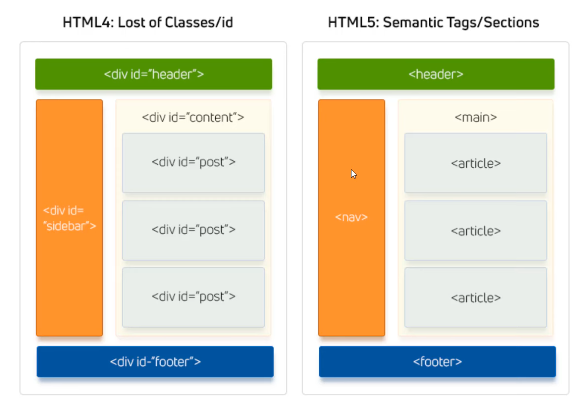
Semantic elements are HTML tags that clearly describe their meaning — both to the browser and to developers. They improve readability, accessibility, and SEO.
Note: Block Element
Tags
<header></header>
<main></main>
<footer></footer>
<aside></aside>
<nav></nav>
<section></section>
<article></article>
<summary></summary>
They tell you what the element is for, rather than how it looks. This improves:
Accessibility (screen readers, assistive tech)
SEO (search engines understand your layout better)
Maintainability (code is easier to read and structure)
<video width="400" controls>
<source src="video.mp4" type="video/mp4">
Your browser does not support the video tag.
</video>
Properties :
inline-block
Opening and Closing Tag
controls : displays the audio player
src : allows you to specify the video file and its type.
type : Helps the browser decide whether it can play the file before downloading it.
width : Sets the width of the video player in pixels.
poster : Defines an image to show before the video plays.
Comparison between Inline , Block and Inline Block
display
Starts on New Line?
Can Set Width/Height?
Behaves Like
Common Example
inline
No
No
Like text
<span>, <a></a>
block
Yes
Yes
Like a box
<div>, <p></p>
inline-block
No
Yes
Mix of both
<img> <button> </button>
Naming Conventions
General Best Practices:
HTML is not case-sensitive
Use lowercase
Use hyphens - for multi-word names
Avoid spaces and special characters
Be semantic and descriptive
Avoid:
Special characters: @, $, #, %, etc.
Starting names with numbers: 1header
Assignment
Write a code of a real website as a blog which contains a header and nav links, two sections each one includes 3 articles,
don't forget the aside and finally the footer including copyright symbol