Text
color : red;
text-shadow: 1px 1px 1px red;
text-align: center ; -> added to <div> which contains paragraph
[center - left - right]
direction: ltr ; & direction: rtl ;
Welcomr in CSS .
Welcomr in CSS .
Text Align Center
color : red;
text-shadow: 1px 1px 1px red;
text-align: center ; -> added to <div> which contains paragraph
[center - left - right]
direction: ltr ; & direction: rtl ;
Welcomr in CSS .
Welcomr in CSS .
Text Align Center
width: 400px;
max-width: 400px;
min-width: 600px ;
width: fit-content;
400px
400px **************************************************** more than 400px
400px **************************************************** more than 400px
fit-content
height: 400px;
max-height: 500;
min-height: 300;
overflow : scroll
width: 150px;
height: 100;
https://www.google.com/search?q=font+awesome&rlz=1C1GCEU_enEG1127EG1127&oq=&gs_lcrp=EgZjaHJvbWUqCQgCECMYJxjqAjIJCAAQIxgnGOoCMgkIARAjGCcY6gIyCQgCECMYJxjqAjIJCAMQIxgnGOoCMgkIBBAjGCcY6gIyCQgFECMYJxjqAjIJCAYQIxgnGOoCMgkIBxAjGCcY6gLSAQkyMDQ0ajBqMTWoAgiwAgHxBUCo6OXL0U4V8QVAqOjly9FOFQ&sourceid=chrome&ie=UTF-8 Lorem ipsum dolor sit, amet consectetur adipisicing elit. Possimus, hic. Autem architecto officiis, nostrum libero odit aliquam dignissimos modi ut quisquam ipsam? Ipsum, libero dolor quia sit hic unde deleniti!
              <div>Div => Block</div>
              <div>Div => Block</div>
              <div>Div => Block</div>

              <span>Span => inline</span>
              <span>Span => inline</span>
              <span>Span => inline</span>
              <div>Div => Block</div>
              div {
              background-color: red;
              width: 200px;
              height: 100px;
              padding: 10px;
              margin: 10px;
            }

            span {
              background-color: rgb(4, 24, 204);
              width: 200px;
              height: 100px;
              padding: 20px;
              margin: 10px;
            }

            span {
              display: inline-block;
              background-color: rgb(4, 24, 204);
              width: 200px;
              height: 100px;
              padding: 20px;
              margin: 10px;
            }
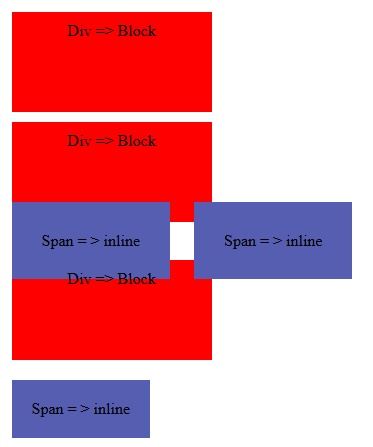
You Can Convert from any case to another by display property
                a {
                    display: block;
                  }
                p {
                  display: inline;
                }
                p {
                  display: inline-block;
                }

          Example
            .one {
              display: block;
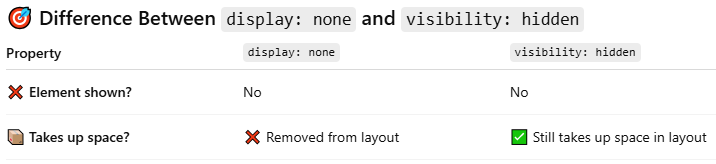
              display: none;
              }
            .two {
              visibility: visible;
              visibility: hidden;
            }