Background
We will take a <div> as example to implement
background-color
- The background-color property in CSS is used to set the background color of an element.
- Default value is transparent.
- background-color: red;
- background-color: rgb(107, 5, 5); or background-color: rgba(107, 5, 5,50%);
- background-color: #eee;
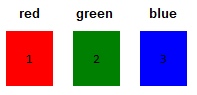
- You can type color by hexadecimal like #eee , #1f1f1f
- rgba : r -> Red color g -> Green color b -> Blur color a -> Alpha
- The alpha value must be a number between (0 and 1), not a percentage.
There are many great websites for discovering and generating beautiful color palettes for your designs

linear-gradient
The linear-gradient() function in CSS is used to create smooth transition between two or more colors along a straight line (vertical, horizontal, diagonal, etc.).
background: linear-gradient(direction, color-stop1, color-stop2, ...);
Examples :
- background: linear-gradient(red, yellow);
- background: linear-gradient(to right, red, yellow);
- background: linear-gradient(45deg, red, blue, green);
background-image
- background-image: url(./img/1.jfif) ;
background-repeat
background-attachment
background-position
background-size
background-repeat
- background-repeat: no-repeat;
- background-repeat: repeat;
- background-repeat: repeat-x;
- background-repeat: repeat-y;
background-attachment
- background-attachment: scroll; => default
- background-attachment: fixed;
background-size
- background-size: auto; => default
- background-size: cover;stretch and cut
- background-size:contain;fully visible
- background-size: 100px 200px ; W H
- background-size: 50% 80% ;
background-position
- background-position: left top; => default
- background-position: left center;
- background-position: left bottom;
- background-position: center top;
- background-position: center center;
- background-position: center bottom;
- background-position: right top;
- background-position: right center;
- background-position: right bottom;
- background-position: 20px 25px;
- background-position: 50% 50%;